
Updated Jan 28, 2026: The highly anticipated on-premises version (Linux x86-64) of Oracle AI Database 26ai and Oracle Grid Infrastructure has been released on the Oracle Software Delivery Cloud (OSDC).
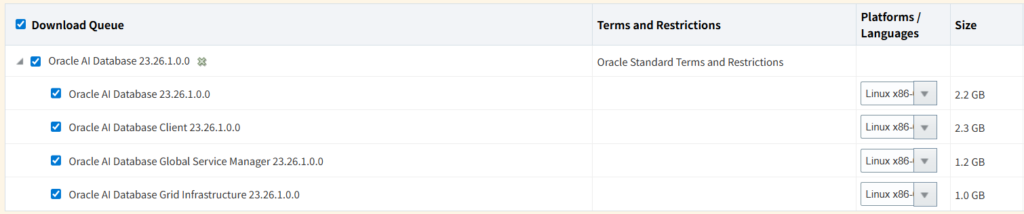
The media pack for Oracle AI Database 26ai has finally appeared on the Oracle Software Delivery Cloud (OSDC). In this article, I will provide a breaking report for engineers on the download procedures for Oracle AI Database 26ai and Oracle Grid Infrastructure 26ai.

Key Takeaways
- Log in to Oracle Software Delivery Cloud and search for “Oracle AI Database 26ai”.
- Select the platform (e.g., Linux x86-64) and add the DLP (Download Package) to your cart.
- Oracle Grid Infrastructure 26ai has been released simultaneously; those building Oracle Real Application Clusters (Oracle RAC) or ASM environments should acquire it as well.
- Select either the ZIP file or RPM format to download.
1. Introduction: What is Oracle AI Database 26ai?
Oracle AI Database 26ai is the latest database version following 23ai. It pushes forward enhancements in AI Vector Search capabilities, further simplification of SQL, and automation of performance tuning.
Now, the installer for on-premises environments (Linux version) has been published on Oracle’s official software distribution site, Oracle Software Delivery Cloud (formerly eDelivery). This enables verification on physical servers and local VM environments.
2. Download Steps (Quickest Path)
The OSDC UI is unique; therefore, I have listed the shortest steps to download without getting lost.
Steps
- Access Oracle Software Delivery Cloud and sign in with your Oracle Account.
- Enter
Oracle AI Database 26aiin the search bar and press the search button. - Click “Oracle AI Database 26ai” from the search results (this adds it to the cart).
- If Grid Infrastructure is required, search for and add
Oracle Grid Infrastructure 26aias well. - Click “View Items” (cart icon) in the upper right corner of the screen, then press “Continue”.
- Select
Linux x86-64from the “Platforms” dropdown menu and press “Continue”. - Review the license terms, check the box, and press “Continue”.
- The file list will be displayed. Click the necessary file (ZIP) to download.
3. Operational and Security Precautions
- License: Downloads from OSDC are limited to use under the Developer License (OTN License Agreement) or a valid support contract. Be sure to check the license terms when applying to a production environment.
- Initial Release: The version immediately following publication (Release 1) may contain unexpected bugs. Avoid immediate application to mission-critical environments; I recommend evaluating it in a verification environment (PoC) first.
- GI Compatibility: When using Oracle Grid Infrastructure 26ai, check the compatibility matrix (MOS Note) to confirm whether it can host lower versions of the Database (19c, 23ai).
4. FAQ (Frequently Asked Questions)
Q1: Is Oracle AI Database 26ai an LTS (Long Term Support) release? A1: It depends on the release cycle. Typically, Oracle designates specific versions as LTS. Since 23ai is the most recent LTS, please check the official “Release Schedule (Doc ID 742060.1)” for the latest status on whether 26ai is an Innovation Release or a candidate for the next LTS.
Q2: Where is the Windows version? A2: Oracle AI Database releases typically start with the Linux version, with the Windows version following a few months later. If Windows is not displayed in the platforms list on OSDC, it will be released at a later date.
Q3: Can I upgrade directly from 19c? A3: Generally, a direct upgrade path is provided from the most recent LTS (19c), but you must verify if the AutoUpgrade tool supports 26ai.
5. Summary
- Oracle AI Database 26ai and GI 26ai (Linux x86-64) have been published on OSDC.
- An Oracle Account is required for download.
- This is an excellent opportunity to try new features (such as AI Vector Search), but ensure verification is performed before production deployment.
Note: This article is written based on information as of January 28, 2026. OSDC screen specifications and file names are subject to change without notice.

コメント