
Do you want to start learning or verifying Oracle Database, but face issues such as “frustrated by the complex environment setup procedure,” “insufficient PC specs,” or “it does not work well on Mac (Apple Silicon)”?
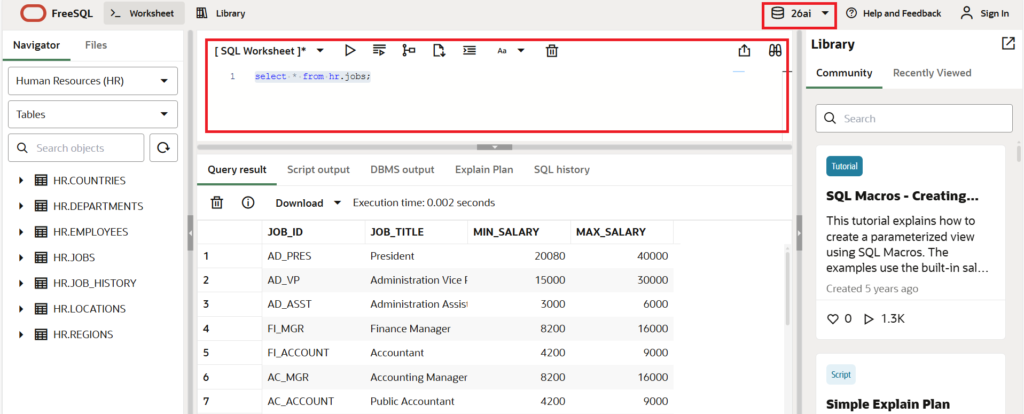
This article explains “FreeSQL,” a free service that allows you to immediately execute Oracle SQL using only a browser. No troublesome installation work is required at all, and you can try everything from the stable 19c to the latest 23ai, and even the preview version 26ai. It is ideal for those who want hands-on operation for qualification exams such as Oracle Master, or engineers who want to quickly check the behavior of the next version.

Conclusion: What You Can Do with FreeSQL (Shortest Steps)
By using FreeSQL, you can start learning SQL in the following 3 steps.
- Access the site: Open the FreeSQL site in your browser. Oracle FreeSQL
- Select version: Select the target from 19c / 23ai / 26ai.
- Execute SQL: Simply input into the editor and press “Execute”.
What You Will Learn in This Article:
- How to try Oracle SQL without a local environment (Compatible with Oracle Master study)
- Specific usage and execution examples of FreeSQL
- How to check the operation of the next version, 26ai
What is FreeSQL? (Background and Basics)
Usually, using Oracle Database requires launching Docker containers or a complex setup using an installer (such as Oracle Universal Installer). These are high hurdles for beginners.
FreeSQL is a sandbox environment where you can execute SQL statements on a web browser. It has the following features:
- No environment setup required: You can use it immediately just by accessing the URL.
- Ideal for Oracle Certified Professional study: The exam scope for Oracle Certified Professional requires not only knowledge of backup and management but also practical knowledge of SQL such as DDL (Data Definition Language), DML (Data Manipulation Language), and transaction control. With FreeSQL, you can actually execute SQL from textbooks…
- Verify operation differences between 19c and 26ai: Just by switching the version via the pull-down menu, you can specifically try differences in behavior, such as “the same SQL causes an error in 19c but passes in 26ai (or vice versa).” It is very useful for compatibility checks before migration and learning new features.
- Free: It is available without user registration (or with only simple authentication).
[Quick Note] What is the difference from Oracle LiveSQL?
Oracle officially offers a similar service called “Oracle LiveSQL,” but logging into an Oracle profile (account) is mandatory to use it. FreeSQL is very popular for learning purposes because it is easier to use and provides quick access to the latest beta versions.
FreeSQL Usage and Steps
We will explain the steps to actually execute SQL using FreeSQL.
Note: The screen configuration may be slightly adjusted depending on the access time.
- Access the FreeSQL siteAccess from a PC or tablet browser.(Reference links are listed at the end of the article)
- Select the database version to connect toSelect the version from the radio buttons or pull-down menu on the screen.
- 19c: The long-term support version running on mission-critical systems in many companies.
- 23ai: The latest version with added features like AI Vector Search.
- 26ai: The next version under development (for advance verification of new features).
- Enter SQLWrite the SQL statement in the text area (editor part) in the center.Although the semicolon (;) at the end of the line may not be necessary depending on the tool, it is recommended to include it as a basic rule.
- Run/ExecuteClick the execute button.Data is displayed in a table format in the “Result” area at the bottom of the screen.
Practice: Oracle SQL Execution Examples
Here we introduce SQL that you can actually copy and paste to try. Let’s also check the differences in behavior depending on the version.
1. Check Version
First, check which version of Oracle you are currently connected to.
-- Display the connected database version
SELECT banner_full
  FROM v$version;
Explanation: v$version is a dynamic performance view that holds database version information. If 23ai or 26ai is displayed here, it is running in that environment.
2. Get Current Date (DUAL table)
This is basic syntax using the dummy table DUAL, which is specific to Oracle.
-- Get current date and time
SELECT sysdate,
       to_char(sysdate, 'YYYY-MM-DD HH24:MI:SS') as current_time
  FROM dual;
3. Create Table and Insert Data (DDL/DML)
In FreeSQL, you can often create temporary tables that are valid only for that session.
-- Create table (Employee table for learning)
CREATE TABLE emp_sample (
    id     NUMBER(5) PRIMARY KEY,
    name   VARCHAR2(50),
    dept   VARCHAR2(20),
    salary NUMBER(8)
);

-- [Oracle Master Point]
-- When you execute DDL such as CREATE TABLE, the INSERTs etc. executed before it
-- are automatically committed (confirmed). Remember this as it is a frequent specification in exams.

-- Insert data
INSERT INTO emp_sample VALUES (101, 'Sato',   'Sales', 300000);
INSERT INTO emp_sample VALUES (102, 'Suzuki', 'IT',    450000);
INSERT INTO emp_sample VALUES (103, 'Takahashi', 'Sales', 320000);

-- Query data (Order by salary descending)
SELECT * FROM emp_sample
 ORDER BY salary DESC;
4. Try Latest Syntax (Comparison of 19c and 26ai)
Select “23ai/26ai” and execute, then switch to “19c” and execute the same SQL. You can experience the difference in behavior between 19c and 26ai.
-- New syntax from 23ai/26ai onwards (FROM dual is not required)
-- * If executed in 19c, it results in an ORA-00923 error
SELECT 'Hello, Oracle 26ai!' as message;
Troubleshooting (Common Errors)
Here are errors likely to be encountered when using FreeSQL and their solutions.
| Error Code / Phenomenon | Cause | Solution |
| ORA-00942: table or view does not exist | The table does not exist, or the created session has expired. | The session may be reset by reloading the web page, etc. Please re-execute from the CREATE statement. |
| ORA-00923: FROM keyword not found… | Forgot to write the FROM clause (especially in 19c). | In versions prior to 19c, FROM dual is mandatory. Please check the version. |
| Response Timeout | Executed a heavy query. | Because it is a shared environment, processing involving large data joins or infinite loops is forcibly terminated. Please narrow down the number of records. |
Operational and Security Precautions
FreeSQL is very convenient, but handling production development or confidential data is strictly prohibited.
- Do not input confidential informationIt is a web service accessed by an unspecified number of people. Absolutely do not INSERT real personal information, passwords, or corporate confidential data. Use only dummy data.
- Data is not savedWhen you close the browser or a certain period of time elapses, the created tables and data disappear. Use it strictly as a “temporary memo pad for learning.”
- Maintenance occurs without noticePreview versions such as 26ai may be unstable and may become unavailable without notice.
FAQ: Frequently Asked Questions
Q1. Is it free? Is credit card registration required?
A. Basically, it is free. Many FreeSQL sites do not require credit card registration and can be used free of charge for learning purposes.
Q2. Can I execute PL/SQL?
A. Yes, it is possible. Anonymous PL/SQL blocks using DECLARE … BEGIN … END; blocks and the creation of functions are basically supported (excluding OS linkage functions such as file output).
Q3. Can I use it on a smartphone?
A. It works if you have a browser. However, since inputting SQL symbols with smartphone flick input is difficult, we recommend using a tablet or PC, or using a Bluetooth keyboard together.
Summary
- FreeSQL is a tool that allows you to immediately execute Oracle SQL from a browser without building an environment.
- By switching between 19c and 26ai, you can easily verify differences in SQL behavior.
- It is ideal for engineers who want to check on actual machines for qualification studies such as Oracle Certified Professional.
- The correct way to use it is as a sandbox (playground) without inputting confidential information.
- First, access the site and start by executing
SELECT * FROM v$version;. You should be able to feel the evolution of Oracle.

コメント